Friday, May 14, 2010

Wednesday, May 12, 2010

Ubuntu 9.10 | Songbird installation

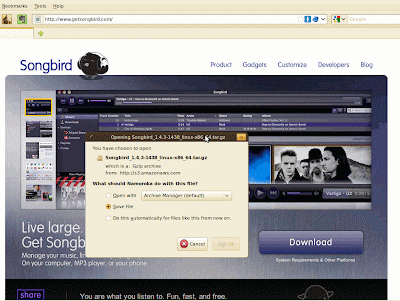
1). Download tar.gz from Songbird website


2). Manually move tar.gz to your home folder (it should be the folder with your name)
3). Extract the tar.gz by right clicking and choosing "extract here"
4). Rename "Songbird" folder to ".Songbird" (this is optional)
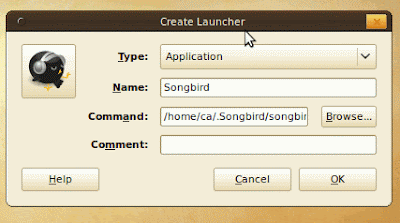
5). Right click your desktop and choose "Create Launcher"


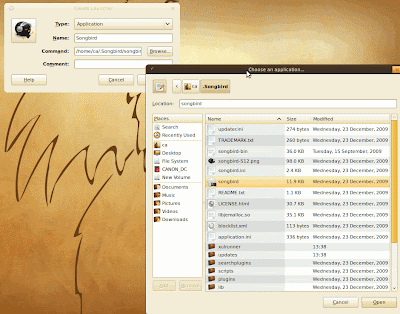
6). On Name field put "Songbird", on Command field just use Browse and locate the Sonbird folder & file.


7). Your desktop now should have an small icon of Songbird

Monday, April 26, 2010

c# | asp.net | DataBinder.Eval DataFormatString

Short date pattern. Format : {0:d}

<asp:TemplateField HeaderText="Position Inclusive Dates"   HeaderStyle-Width="75px" SortExpression="">
<ItemTemplate>
<asp:Label ID="_lblPositionIncDate" width="75px" runat="server" Text='<%# DataBinder.Eval(Container, "DataItem.PositionIncDate") %>'></asp:Label>
</ItemTemplate>
<EditItemTemplate>
<asp:TextBox ID="_tbPositionIncDate" width="75px" runat="server" Text='<%# DataBinder.Eval(Container, "DataItem.PositionIncDate") %>'></asp:TextBox>
</EditItemTemplate>
<HeaderStyle HorizontalAlign="Center" />
</asp:TemplateField>


More on => BoundField::DataFormatString Property

Saturday, April 24, 2010

ASP.NET | GridView Tips

Extract GridView data to Xls file:

protected void _btnOutputGridViewToXls(object sender, EventArgs e)
{
Response.AddHeader("content-disposition", "attachment;filename=MySample.xls");
Response.Charset = String.Empty;
Response.ContentType = "application/vnd.xls";
System.IO.StringWriter strWr = new System.IO.StringWriter();
System.Web.UI.HtmlTextWriter htmWr = new HtmlTextWriter(strWr);
GridView1.RenderControl(htmWr);
Response.Write(strWr.ToString());
Response.End();
}

Wednesday, April 7, 2010

Windows 7 64bit Activation Problem (0xC004F009)

Windows 7 Activation Error Code 0xC004F009


Symptom
- When you try to use a MAK to activate one or more computers, you may receive the following error message:
0xC004F009
The software Licensing Service reported that the grace period expired.

Cause
- This issue may occur if the grace period expires before the system is activated. The system is now in Reduced Functionality Mode (RFM).

Workaround
- Follow the RFM recovery guidelines in the Volume Activation 2.0 Step-By-Step Guide. To obtain this guide, visit the following Microsoft Web site:
http://technet.microsoft.com/en-us/library/cc303695.aspx

The Real Solution
- Call Microsoft, that easy! c")

Sunday, April 4, 2010

c# | asp.net | DropDownList SelectedIndex Alignment

ddlPatient.SelectedIndex = ddlPatient.Items.IndexOf(ddlPatient.Items.FindByValue(lblPatientIdHidden.Text));

Thursday, April 1, 2010

Nokia E71 | Firmware upgrade (How to apply device software update)

My wife is complaining me about her weird problem on her Nokie E71 cellphone, though I know that it's need a software/firmware upgrade, but haven't had a time to do it, But today, as my number #1 priority on my ToDo list, that time has come.

Here's the quick list you what you needs & to do:
- Download Nokia E71 Device software update, since am only the Far East, I downloaded my device on Nokia Philippines - Device Software Update, then installed & runit. Follow the software instrustion, and your done


- Now the tricky part, which took me long hours to figure out. In the event that the "Nokia Software Updater" could not detect your cellphone, try to Do A Hard Reset On Your E71 If You Start Having Problems and repeat the above procedure.